MicroFab: Why Build a Desktop CNC for PCB Milling?
Can a CNC machine be small enough to live on an indoor workbench, yet rigid and accurate enough to mill surface-mount PCBs? MicroFab started as an attempt to find out.

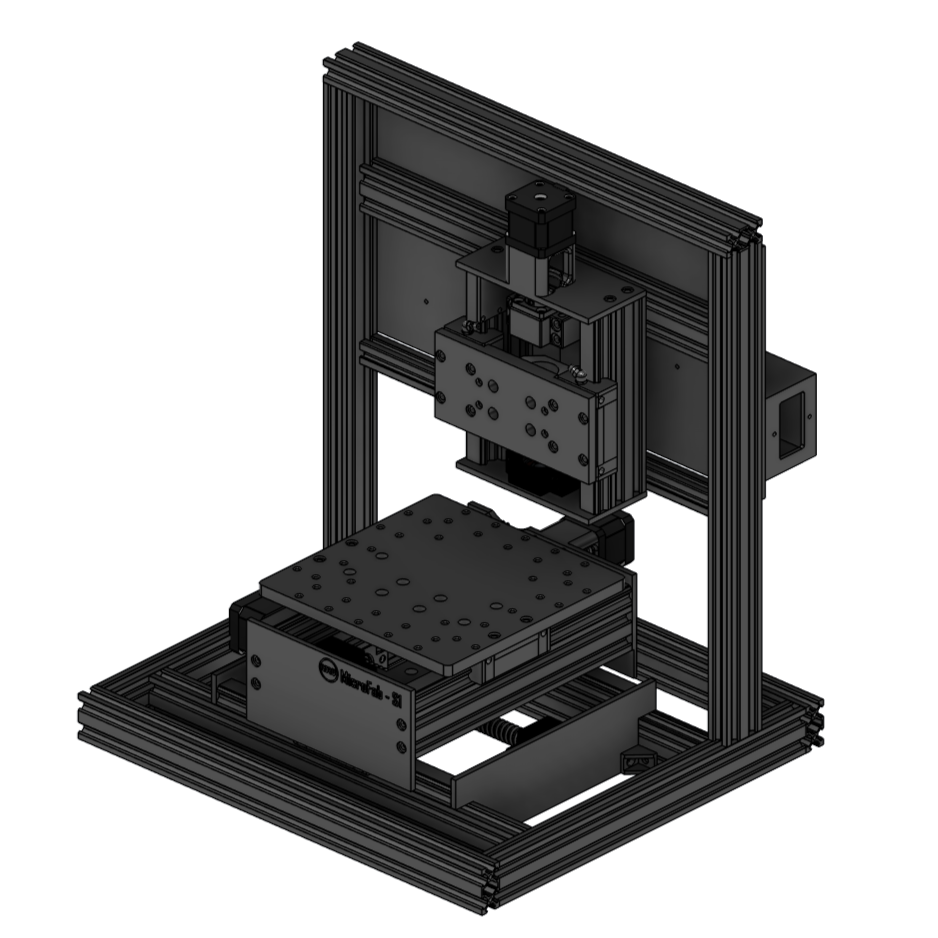
MicroFab is my attempt to design and build a compact, rigid CNC machine capable of accurately milling surface-mount PCBs on an indoor home workbench.
This series documents the design decisions, experiments, mistakes and engineering lessons along the way.
The project started with a fairly simple question:
Can a CNC machine be made small enough to live comfortably on a workbench, while still being rigid and accurate enough to mill useful surface-mount PCBs?
That sounds straightforward, but the more I thought about it, the more I realised that the requirements pull in different directions.
Small machines are easy to fit on a bench, but reducing size does not automatically make a machine rigid or accurate. PCB milling requires very small and repeatable movements. An indoor machine also has to deal with noise, dust, electronics, cable management and enclosure requirements in a way that a larger garage or workshop CNC might not.
MicroFab grew out of trying to balance all of those things in one machine.
The problem I am trying to solve
Like many electronics projects, the starting point was not really the CNC machine itself.
The real problem was PCB prototyping.
When experimenting with electronics, there is often a point where a breadboard is no longer enough. Surface-mount components are common, compact designs are easier to work with on a proper PCB, and sometimes you simply want something more permanent than a collection of jumper wires.
Ordering prototype boards professionally is incredibly accessible these days, but it introduces a delay between making a design change and being able to test it physically.
For a finished design, that is perfectly reasonable.
For experimentation, however, the workflow can become:
- change the PCB,
- generate the manufacturing files,
- order boards,
- wait for delivery,
- assemble the board,
- discover something that needs changing,
- repeat the process.
I wanted another option.
Not necessarily a replacement for professionally manufactured PCBs, but a way to move much faster during the early stages of development.
The idea was to be able to make a small board, test it, modify the design and potentially make another version on the same day.
That is the problem MicroFab is intended to solve.
Why PCB milling?
There are several ways of making prototype PCBs at home.
Chemical etching is one of the traditional approaches, and it can produce very good results. But it also means dealing with chemicals, storage, disposal and a process that I did not particularly want to introduce into an indoor workspace.
PCB milling takes a different approach.
Instead of chemically removing unwanted copper, a very small milling cutter mechanically removes copper from the PCB surface to isolate the required tracks and pads.
In principle, the workflow is attractive.
Start with a copper-clad board, load the PCB design into the appropriate software, machine the isolation paths, drill the holes and potentially cut the finished board outline.
There are no photographic masks and no etching chemicals.
More importantly for the type of work I want to do, it fits naturally into a CAD/CAM-style engineering workflow.
Make a change to the design, regenerate the toolpaths and machine another board.
That is the appeal.
Of course, the phrase "just mill the PCB" hides quite a lot of difficulty.
The copper layer on a PCB is extremely thin. Isolation cuts are shallow. The cutter diameter can be very small. Small differences in board height can change the effective width and depth of a cut.
As soon as the goal moves from large through-hole boards toward surface-mount designs, the mechanical requirements become much more demanding.
And that is where this stopped being a simple CNC project and became an interesting engineering problem.
Why existing hobby CNC machines weren't quite what I wanted
There are already plenty of small hobby CNC machines available.
Some are inexpensive. Some have very active communities around them. Some are capable of doing surprisingly good work after careful setup and modification.
So why build another one?
The answer is not that existing machines are bad.
It is that I had a fairly specific combination of requirements.
I did not want a general-purpose router that happened to be capable of occasionally milling a PCB.
I wanted a machine designed primarily around small, precise work.
That changes the priorities.
Large cutting area was not particularly important.
A large Z-axis travel was not particularly important.
The ability to cut thick aluminium plates or large pieces of wood was not the primary goal.
Instead, I cared more about things such as:
- rigidity,
- short mechanical load paths,
- minimal spindle movement,
- repeatability,
- low backlash,
- a small footprint,
- stable workholding,
- easy access to the PCB,
- accurate positioning,
- and eventually being able to enclose the entire machine.
There was also another practical constraint.
I wanted it to live indoors.
That means a machine that looks perfectly reasonable sitting in a garage can suddenly become too large once it has to share an electronics workbench with test equipment, soldering tools and other projects.
MicroFab therefore needed to be designed around the workspace rather than expecting the workspace to adapt around the CNC.
The difficult combination: small and rigid
One of the most interesting parts of this project is that small and rigid are related, but they are not the same thing.
Making something smaller can help rigidity because structural members become shorter.
A shorter beam generally deflects less than a longer one under the same load.
That sounds ideal.
But compact machines introduce their own compromises.
Components still need somewhere to go.
Motors occupy space.
Linear rails need mounting surfaces.
Ball screws or lead screws need support.
Bearings need spacing.
The spindle needs clearance.
The workpiece needs to remain accessible.
Cables have to move without interfering with anything.
And eventually all of it needs to fit inside an enclosure.
If everything is simply pushed closer together, the result can become difficult to assemble, difficult to align and even more difficult to maintain.
The design problem is therefore not simply:
Make the machine as small as possible.
It is:
Remove unnecessary size without compromising the mechanical structure or usability of the machine.
That distinction became important very early in the design.
I wanted the machine to be compact because the intended working area is small, not because every component had been squeezed together with no margin left for practical use.
What does "accurate enough" actually mean?
"Accurate" is one of those words that gets used very easily when talking about CNC machines.
But accurate enough for what?
A machine that is perfectly acceptable for cutting a wooden sign may not be accurate enough for a small PCB.
Likewise, a machine designed for PCB isolation routing does not necessarily need the same structural capacity as a CNC intended to remove large amounts of aluminium.
For MicroFab, the useful definition of accuracy has to come from the job the machine needs to perform.
The machine needs to position the cutter consistently enough that isolation tracks remain where they are supposed to be.
It needs to repeat movements closely enough that drilling, routing and later operations line up.
The spindle and Z-axis need to be stable enough that very shallow cuts remain predictable.
The bed needs to be sufficiently flat, or its surface variation needs to be compensated for, because even small height changes become important when working with thin copper.
Backlash matters.
Runout matters.
Squareness matters.
Repeatability matters.
But I do not want to define success using an impressive-looking specification on paper.
Ultimately, there is a much simpler test:
Can MicroFab reliably produce the PCB geometry I actually want to use?
That will eventually become one of the major tests of the project.
The intention is not to claim extreme precision before measuring it.
The intention is to design toward the required precision, measure the machine properly once it is running, and then see what it can genuinely produce.
Designing for an indoor workbench
Putting the machine indoors introduces another set of requirements that are easy to ignore when thinking only about the mechanics.
The machine cannot simply throw dust and PCB material around the room.
Noise matters more indoors.
The electronics need to be protected.
Cables need to be contained.
Access to the machine needs to remain convenient.
The enclosure needs to be part of the design rather than something improvised afterwards.
That influenced the overall structure of MicroFab from the beginning.
The outer frame is not only there to support the mechanical system.
The intention is for it to eventually become the skeleton of the enclosure as well.
That gives the structure more than one purpose.
It defines the machine footprint.
It supports the CNC mechanics.
It provides mounting opportunities for panels and electronics.
And eventually it should help contain noise, chips and dust.
That is a much more integrated approach than building an open-frame machine first and then trying to find a box large enough to cover it.
The MicroFab design goals
At this stage, the project can be summarised with a relatively small set of design goals.
MicroFab should be:
Compact: It should fit comfortably on an indoor electronics workbench without taking over the entire workspace.
Rigid: The mechanical structure should prioritise stiffness and minimise unnecessary overhang and flex.
Precise: The motion system should be capable of repeatable movement suitable for PCB isolation milling and drilling.
Purpose-built: The machine does not need to be a general-purpose CNC router. Its design can be optimised for small, precise PCB work.
Enclosed: The frame should eventually become part of a proper enclosure suitable for indoor operation.
Serviceable: Despite its small size, the machine should still be practical to assemble, adjust, wire and maintain.
Measurable: Performance should eventually be tested rather than assumed. Backlash, repeatability, runout, squareness and PCB results all need to be measured.
Iterative: This is an engineering project, not a finished commercial product.
If something does not work as expected, it gets changed.
That is part of the reason for documenting the project in the first place.
Where the project goes from here

At the time of writing, MicroFab has moved well beyond the initial idea.
The machine has been designed in detail in CAD, and the mechanical parts have been fabricated, 3D printed and assembled.
The electronics hardware has also been installed.
What has not happened yet is the wiring, commissioning and testing.
That makes this a useful point to start documenting the project properly.
The next articles will work backwards slightly through the thinking that led to the current design before moving forward again into the live build.
I want to cover the design requirements in more detail, the overall machine architecture, the CAD design and the reasoning behind the major component choices.
From there, I will go through the mechanical build in stages: the X-axis, Y-axis, Z-axis and frame.
The frame will eventually become the basis of the enclosure, which deserves its own discussion because indoor operation was one of the original design constraints.
After that comes the part I have not completed yet: wiring the electronics, powering the machine for the first time, configuring the motion system, measuring accuracy and repeatability, and finally attempting to mill the first PCB.
That last stage is where the project will either validate the design decisions made along the way or expose the next round of problems that need solving.
Either outcome will be useful.
MicroFab started with one question:
Can a CNC machine be small enough to live on an indoor workbench, yet rigid and accurate enough to mill surface-mount PCBs?
Now it is time to find out.